Low-code database builders are revolutionizing how developers and businesses create and manage databases. These platforms enable you to design database schemas, create tables, define relationships, and build interfaces with minimal coding required.
In this comprehensive comparison, we'll analyze three leading low-code database builders: SQL Data Builder, Bubble, and Retool. Each platform has unique strengths that cater to different use cases, from solo developers to enterprise teams.
1. SQL Data Builder - Affordable Database Management for VPS Users
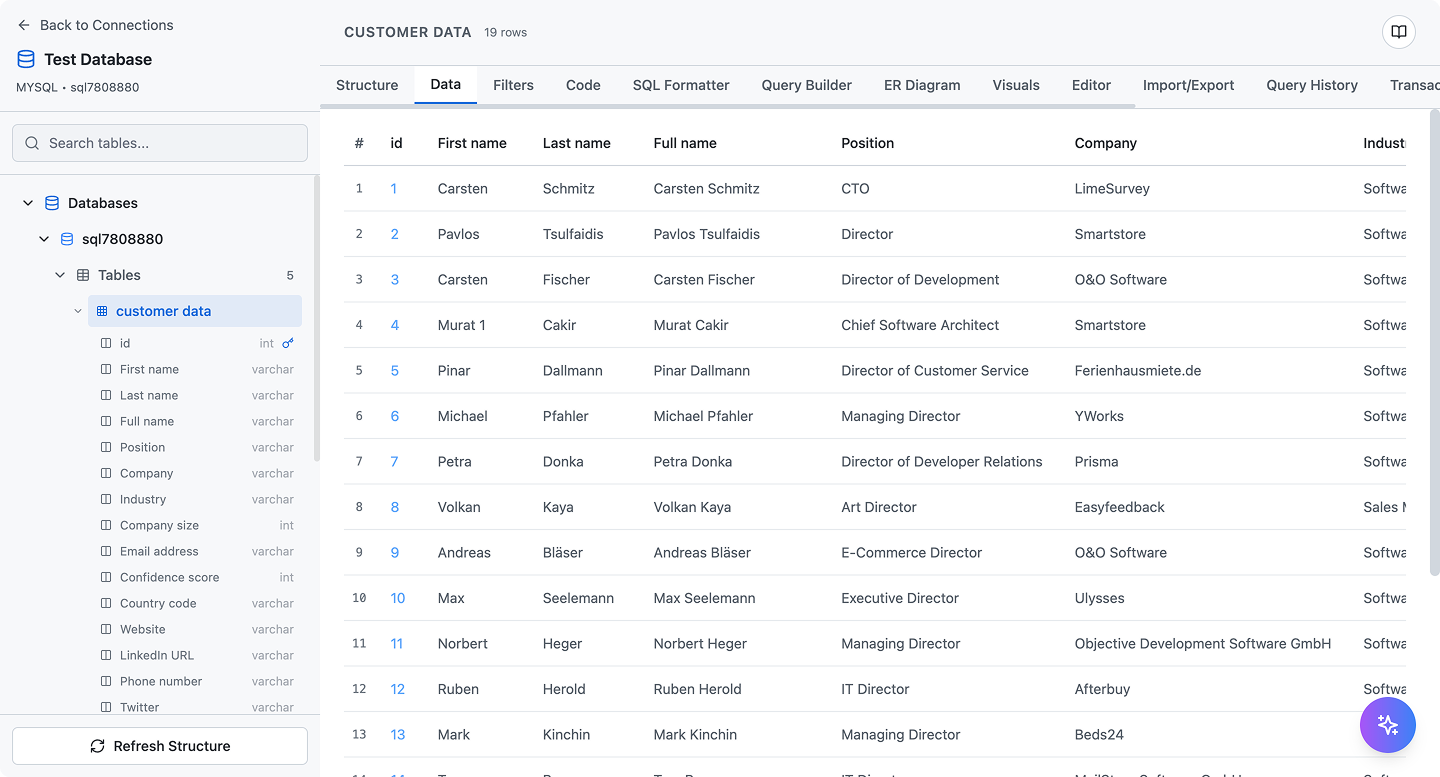
SQL Data Builder provides visual database management with ER diagrams and SQL code generation
SQL Data Builder is a specialized low-code tool designed for managing SQL databases on your own infrastructure. It connects directly to your MySQL, PostgreSQL, or SQLite databases and provides a visual interface for database operations.
Key Features
- Visual Database Design: Create tables, columns, and relationships through an intuitive drag-and-drop interface
- Automatic ER Diagrams: Generate entity-relationship diagrams automatically from your database schema
- SQL Code Generation: Every visual action displays the equivalent SQL code for learning and transparency
- Direct Database Connection: Works with your existing MySQL, PostgreSQL, or SQLite databases
- VPS Integration: Part of VPS Commander suite, seamlessly integrates with server management
- Data Import/Export: Import from CSV, Excel, JSON, or export to various formats
- Query Builder: Visual query building with filters, sorting, and joins without writing SQL
- Full Data Ownership: All data stays on your own database server
Pricing
- Monthly Plan: $2.99/month (includes VPS Commander access)
- Annual Plan: $29.99/year (save 17%)
- No per-user fees: One subscription covers unlimited database projects
Note: SQL Data Builder is included with VPS Commander subscription, making it exceptional value for server administrators.
Best For
- VPS users managing their own databases
- Developers learning SQL through visual tools
- Small teams on tight budgets
- Projects requiring full data ownership
- Database prototyping and schema design
Pros & Cons
Pros:
- Extremely affordable at $2.99/month
- Automatic SQL code generation for learning
- Professional ER diagram generation
- Works with standard SQL databases
- Complete data ownership and control
- No vendor lock-in
Cons:
- Requires your own VPS or database server
- No built-in collaboration features
- Limited to SQL databases (no NoSQL support)
- Fewer integrations compared to enterprise platforms
2. Bubble - Full-Stack Low-Code Application Builder

Bubble combines database design with full application development capabilities
Bubble is a comprehensive low-code platform that goes beyond database building to enable full-stack application development. While it includes powerful database capabilities, Bubble is designed for creating complete web applications without traditional coding.
Key Features
- Visual Database Designer: Create custom data types with fields and relationships visually
- Full Application Builder: Build frontend interfaces, workflows, and logic in one platform
- Privacy Rules: Define granular data access permissions at the database level
- API Connector: Connect to external databases and services via REST APIs
- Workflow Engine: Create complex business logic with visual workflow builder
- Responsive Design: Build mobile-responsive apps without CSS
- Plugin Marketplace: Extend functionality with hundreds of community plugins
- Version Control: Built-in version history and deployment management
Pricing
- Free Plan: Limited to Bubble subdomain, basic features
- Starter: $29/month (custom domain, more capacity)
- Growth: $119/month (increased capacity, priority support)
- Team: $349/month (collaboration features, higher limits)
- Enterprise: Custom pricing (dedicated infrastructure)
Note: Higher plans required for production apps with significant traffic. Workload units add additional costs.
Best For
- Building complete web applications, not just databases
- Startups creating MVPs without hiring developers
- Non-technical founders building SaaS products
- Projects needing integrated frontend and backend
- Teams wanting rapid application prototyping
Pros & Cons
Pros:
- Complete application development platform
- No coding required for full-stack apps
- Powerful visual workflow engine
- Large community and plugin ecosystem
- Handles hosting and infrastructure
- Excellent for rapid MVP development
Cons:
- Proprietary database (vendor lock-in)
- Can become expensive at scale
- Performance limitations for complex apps
- Steep learning curve despite "no-code" label
- Limited control over underlying infrastructure
- Workload unit system can be confusing
3. Retool - Internal Tool Builder with Database Support

Retool specializes in building internal admin panels and business tools
Retool is a low-code platform focused on building internal tools, admin panels, and dashboards that connect to existing databases. While not primarily a database builder, it provides Retool Database and excels at creating interfaces for data management.
Key Features
- Retool Database: Managed PostgreSQL database included (up to 1GB free)
- 50+ Pre-built Components: Tables, charts, forms, and UI elements ready to use
- Multi-Database Support: Connect to PostgreSQL, MySQL, MongoDB, REST APIs, GraphQL
- JavaScript Integration: Write JavaScript for custom logic when needed
- Granular Permissions: Role-based access control for team members
- Version Control: Git-based version control for applications
- Self-Hosting Option: Deploy Retool on your own infrastructure
- Mobile Apps: Build mobile-responsive internal tools
Pricing
- Free Plan: Up to 5 users, unlimited apps, 1GB Retool Database
- Team: $10/user/month (billed annually) or $12/month (monthly)
- Business: $50/user/month (advanced features, SSO)
- Enterprise: Custom pricing (self-hosting, dedicated support)
Note: For a 50-person team, Business plan costs $30,000/year.
Best For
- Building internal admin panels and dashboards
- Creating CRUD interfaces for existing databases
- Teams needing quick data management tools
- Organizations with technical users comfortable with some code
- Companies wanting to connect multiple data sources
Pros & Cons
Pros:
- Excellent for internal tools and admin panels
- Connects to virtually any database or API
- Rich component library accelerates development
- JavaScript support for customization
- Self-hosting option available
- Generous free tier (5 users)
Cons:
- Not designed for public-facing applications
- Requires some JavaScript knowledge for advanced features
- Per-user pricing can get expensive
- Limited database building capabilities
- Learning curve for complex use cases
Side-by-Side Comparison
| Feature | SQL Data Builder | Bubble | Retool |
|---|---|---|---|
| Primary Use Case | Database management | Full-stack app building | Internal tools & admin panels |
| Pricing (Starting) | $2.99/month | Free (limited) / $29/month | Free (5 users) / $10/user/month |
| Database Type | MySQL, PostgreSQL, SQLite | Proprietary cloud database | PostgreSQL (Retool DB) + connect to any |
| Data Ownership | Your own server | Bubble's cloud only | Your DB or Retool's cloud |
| Visual Database Design | Yes (ER diagrams) | Yes (data types) | Limited (Retool DB only) |
| SQL Code Generation | Yes (every action) | No | No (manual SQL queries) |
| Frontend Builder | No (database-focused) | Yes (full visual designer) | Yes (component library) |
| Workflow Automation | No | Yes (advanced) | Yes (query-based) |
| Public Web Apps | No | Yes | No (internal only) |
| Coding Required | None (shows SQL code) | None (optional plugins) | Some (JavaScript for logic) |
| Self-Hosting | Connects to your DB | No | Yes (Enterprise plan) |
| Learning Curve | Low | Medium-High | Medium |
| Best For | Database management & learning | Complete web applications | Internal tools & dashboards |
Use Case Scenarios
Scenario 1: Database Design for Existing VPS Application
Best Choice: SQL Data Builder
If you're running an application on a VPS with MySQL or PostgreSQL and need to design new database schemas, add tables, or visualize relationships, SQL Data Builder at $2.99/month is the perfect tool. It connects directly to your existing database and provides professional ER diagrams.
Scenario 2: Building a SaaS MVP from Scratch
Best Choice: Bubble
For non-technical founders wanting to build a complete web application with user authentication, payments, and complex workflows, Bubble enables you to create a full SaaS product without hiring developers. The integrated frontend and backend make it ideal for MVPs.
Scenario 3: Internal Admin Panel for Operations Team
Best Choice: Retool
If you need to give your operations team access to view, edit, and manage data across multiple databases and APIs, Retool excels at quickly building secure internal tools with proper permission controls.
Scenario 4: Learning SQL While Building Real Projects
Best Choice: SQL Data Builder
SQL Data Builder's unique code generation feature makes it an excellent educational tool. Every visual action shows you the actual SQL commands being executed, helping you learn industry-standard SQL while building real database applications.
Final Verdict: Which Tool Should You Choose?
Quick Decision Guide
- Choose SQL Data Builder if: You need affordable database management for your VPS, want to learn SQL through visual tools, or require full data ownership ($2.99/month)
- Choose Bubble if: You're building a complete web application with frontend and backend, need rapid MVP development, and don't require direct database access ($29+/month)
- Choose Retool if: You're building internal tools and admin panels, need to connect multiple data sources, and have users comfortable with some code ($10+/user/month)
The Winner by Category
- Best Value: SQL Data Builder ($2.99/month for comprehensive database management)
- Best for Full Applications: Bubble (complete frontend + backend platform)
- Best for Internal Tools: Retool (specialized for admin panels and dashboards)
- Best for Learning: SQL Data Builder (automatic SQL code generation)
- Best for MVPs: Bubble (fastest path to functional web app)
- Best for Data Ownership: SQL Data Builder (uses your own database)
Conclusion
The low-code database builder landscape offers distinct solutions for different needs. SQL Data Builder provides exceptional value for database-focused work at just $2.99/month, making it ideal for VPS users and those learning SQL. Bubble enables non-technical founders to build complete SaaS applications with integrated databases and frontends. Retool specializes in creating internal tools that connect to existing databases.
Your choice depends on your specific project requirements. If you're managing databases on a VPS and want professional tools without breaking the bank, SQL Data Builder is unbeatable. If you're building a complete web application, Bubble offers the most comprehensive platform. If you need internal admin tools, Retool provides the fastest development experience.
For most developers working with SQL databases on their own infrastructure, SQL Data Builder offers the best combination of features, affordability, and educational value.
Ready to Start Building Your Database?
Try SQL Data Builder today and experience visual database management with professional ER diagrams and SQL code generation.
Get Started for $2.99/month